Crop GIF
Drag to crop and resize the GIF. The same crop applies to every frame. Files and entered content are not sent to or stored on a server.
How to use · Supported formats & limits
How to use
Drag to crop and resize the GIF. The same crop applies to every frame.
Supported formats & limits
GIF → GIF
Limits: 240 frames and an estimated decoded size of 192 MiB. GIF supports up to 256 colors and fully transparent or opaque pixels.
Re-encoding a GIF can change its colors and file size.
Crop GIF User guide
Instructions
- Choose one GIF.
- Drag to crop and resize the GIF. The same crop applies to every frame.
- Review the newly encoded animation and download.
Example
Input / settings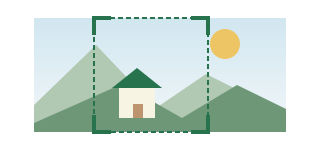
A landscape photo with extra space around the subject
Result / checks
A square crop for a profile picture
Please note
- Re-encoding a GIF can change its colors and file size.
- Video, audio and animated WebP, AVIF or APNG are not supported.